Choose a step
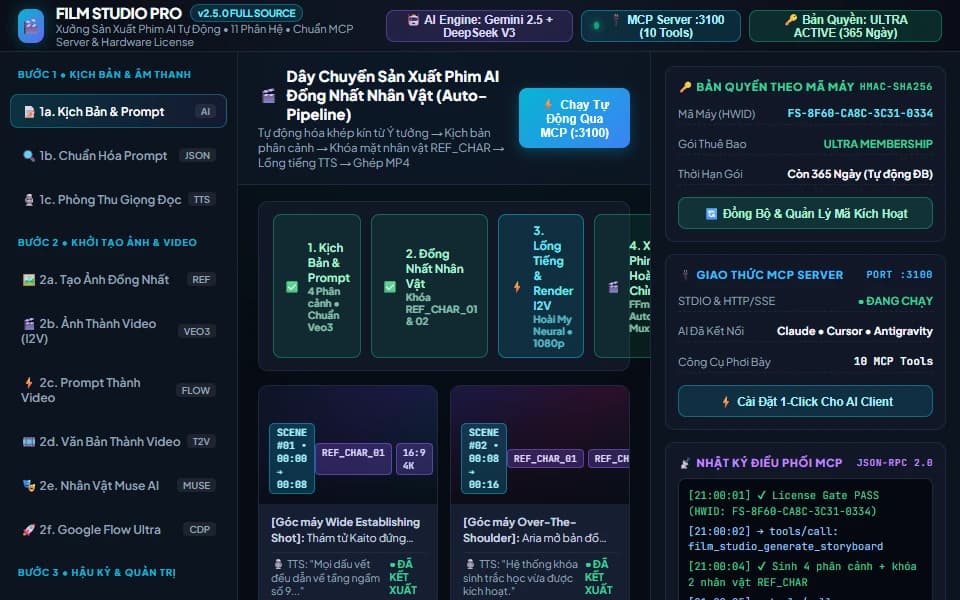
Film Studio Pro — AI Video Suite & MCP Server
Film Studio Pro v2.5.0 is an all-in-one desktop AI film & video production suite (11 modules) featuring a built-in Model Context Protocol (MCP) Server (:3100) and Hardware Machine ID licensing synced with your Forge Zone plan.
Standard workflow: Download → Unzip → Run Film_Studio_Pro_Setup_v2.5.0.exe → Activate Machine ID (/kich-hoat) → Launch Film Studio Pro & 1-Click MCP
Step 1 · Run the Standalone Windows PC Installer (Film_Studio_Pro_Setup_v2.5.0.exe)
- Download film-studio.zip and extract it on Windows 10 / 11 (64-bit).
- Double-click `Film_Studio_Pro_Setup_v2.5.0.exe` (standalone Windows Setup Wizard — NO Python installation required).
- Keep *Create Desktop Shortcut* and *Auto-connect 1-Click MCP* checked, click 🚀 Bắt đầu cài đặt (Install), and launch Film Studio Pro from your Desktop.
Step 2 · Hardware Machine ID Activation (/kich-hoat)
- Click 🔑 Bản Quyền (License) in the top bar of the app and copy your device's Machine ID (
FS-XXXX-XXXX-XXXX-XXXX). - Visit [forgezone.store/kich-hoat](/kich-hoat) (or your Account / Orders page), sign in, and paste your Machine ID to generate an HMAC-SHA256 signed `FZKEY-...` matching your plan duration (Monthly Pro, Yearly Ultra, or Lifetime).
- Paste the
FZKEY-...into the app and click Activate, or simply click 🔄 Sync Online from Web inside the dialog.
Step 3 · Configure AI Engine & Use the 11 Production Modules
Click 🤖 AI Engine in the header to set your Gemini, OpenAI, or DeepSeek API key, then follow the 3-stage sidebar:
- Stage 1 (Script & Audio):
1aStoryboard & Prompt Generator,1bPrompt Normalizer,1cMulti-Thread Neural TTS Studio. - Stage 2 (Consistent Visuals & Video):
2aREF_CHARCharacter Consistency Image Generator,2bImage-to-Video (I2V),2cPrompt-to-Video,2dText-to-Video,2eMuse AI Character Video,2fGoogle Flow Ultra CDP Engine. - Stage 3 (Post-Production & Admin):
3aFFmpeg Auto-Assembly & MP4 Export,3bAccount & Profile Manager.
Step 4 · 1-Click MCP Server Connection (:3100)
Run `CAI_DAT_KET_NOI_MCP_1CLICK.bat` (or click 🔌 MCP: :3100 in the app) to automatically register all 10 MCP tools (film_studio_auto_produce_pipeline, film_studio_generate_storyboard, film_studio_synthesize_voice, film_studio_assemble_video, etc.) into Claude Desktop, Cursor, Windsurf, Cline, and Antigravity over STDIO or HTTP/SSE (http://127.0.0.1:3100/sse).